We will send the plugin directly to your inbox! Important: We only use your email to send notifications if a new version is available.
Deprecated: Non-canonical cast (boolean) is deprecated, use the (bool) cast instead in /home/u544186188/websites/HC8ZME87r/public_html/wp-content/plugins/fluentform/app/Services/Parser/Form.php on line 291
Super Order Bump
We will send the plugin directly to your inbox! Important: We only use your email to send notifications if a new version is available.
Padding vs Margin: Cracking the code of spacing in web design
UX♥️Written with ❤️ by us.
When I first started learning web design, the battle between padding vs margin felt like deciphering a secret code. If you’re here, you’ve probably wrestled with the same question: “What’s the difference, and when should I use each?” Let me tell you—it’s simpler than it seems, and by the end of this post, you’ll not only master it but also appreciate why this distinction is so important.
What’s the deal with Padding vs Margin?
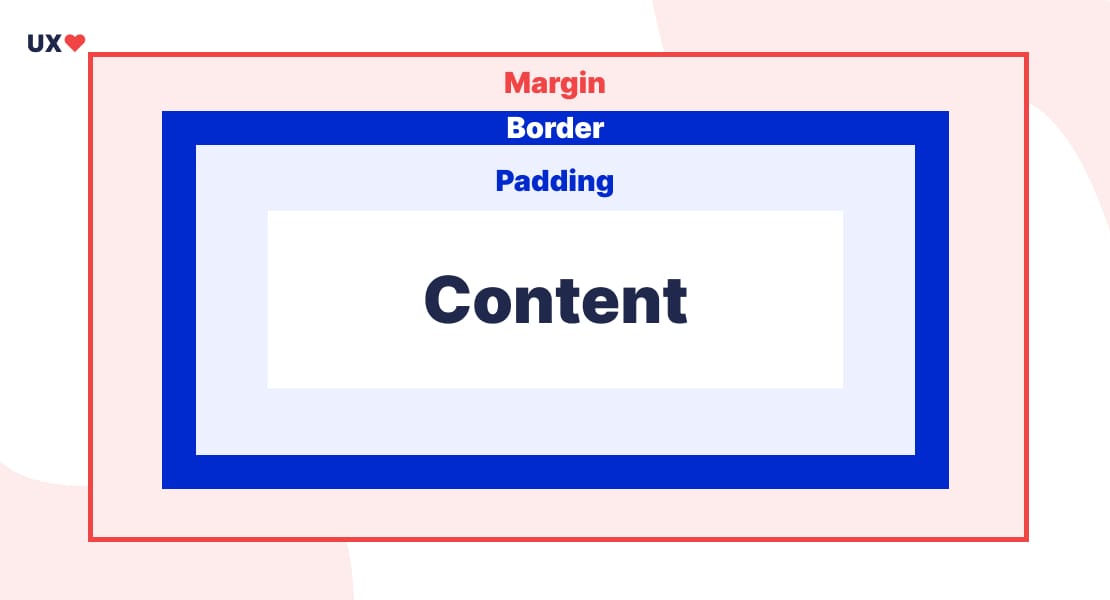
Both padding and margin are about spacing, but they serve very different purposes. Think of your content as a delicate gift wrapped inside a box. Here’s the breakdown:
Padding: This is the space inside the box, between your content and the box’s edge. It’s like adding bubble wrap to protect your gift.
Margin: This is the space outside the box, creating distance between the box and other objects. It’s like giving your gift breathing room on a crowded table.
Understanding these basics will help you design layouts that look clean and professional.
My “aha!” moment with paddings and margins
I’ll never forget the moment I truly understood this concept. I was working on a simple portfolio site, and every element looked squished. Adjusting the padding made my containers feel more spacious, but the elements still felt like they were fighting for space. That’s when I discovered the power of margins. Adding margins created harmony between my sections, and suddenly, my layout looked intentional and polished.
Padding: The secret to cozy content
Let’s start with padding. It’s all about giving your content some breathing room within its container. Here are some scenarios where padding shines:
Buttons: Ever clicked on a button that feels cramped? That’s a lack of padding! Adding padding ensures your text has enough space, making the button feel clickable and visually appealing.
Card Designs: When you’re designing cards for a blog or product, padding ensures your text or images don’t feel glued to the edges.
Have a look at this great example from this Medium article about the subject which describes it pretty well:
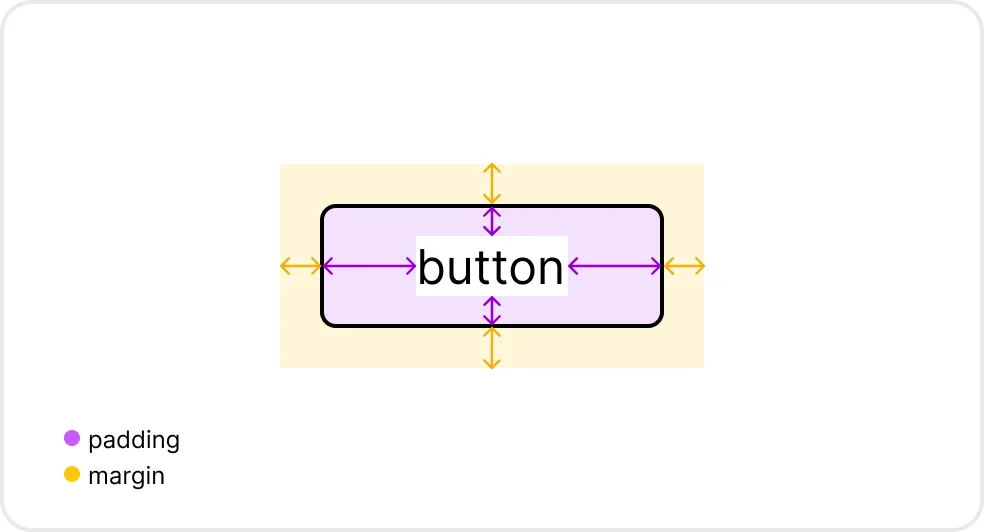
Tip: Use consistent padding for a unified design!
Margin: The art of space between elements
Now let’s talk about margin. Margins are the unsung heroes of layout design. They ensure your elements aren’t awkwardly crammed together.
Here’s when you’ll rely on margins:
Spacing Between Sections: Margins create clear separations, making your content easier to read and navigate.
Centering Elements: Want to center a div? Use margin: auto; to make it happen!
button {
margin: 20px 0;
}
Pro Tip: Margins can collapse if two elements touch. Don’t panic—it’s a feature, not a bug!
Padding vs Margin: when to use each
Here’s a handy rule of thumb:
Use Padding to create space insidean element. It’s about content comfort.
Use Margin to create space between elements. It’s about layout structure.
For example:
Want a bigger clickable area for a button? Use padding.
Want to separate that button from other elements? Use margin.
Common mistakes (and how to avoid them!)
Overlapping Spacing: Adding both padding and margin can sometimes overdo it. Keep it simple by using one or the other.
Neglecting Responsiveness: Always test your padding and margin on different screen sizes. What looks great on desktop might look crowded on mobile.
Tools to help you master spacing
If you’re a visual learner like me, tools like Chrome DevTools are lifesavers. Use the “Inspect” tool to see how padding and margin affect your elements in real-time. Look for the blue (padding) and orange (margin) highlights—they’re game-changers!
Final thoughts on Padding vs Margin
Understanding padding vs margin might seem small, but it’s one of those details that separates beginner designs from professional ones. The next time you’re arranging elements on a page, think about the gift box analogy and let padding and margin work their magic.
What’s Your Padding vs Margin Story?
I’d love to hear about your journey with spacing in web design. Drop your thoughts or questions in the comments below. And if you found this post helpful, share it with a fellow designer who’s ready to level up their skills!
Manage Consent
To provide the best experiences, we use technologies like cookies to store and/or access device information. Consenting to these technologies will allow us to process data such as browsing behavior or unique IDs on this site. Not consenting or withdrawing consent, may adversely affect certain features and functions. Thank you ❤️
Functional
Always active
The technical storage or access is strictly necessary for the legitimate purpose of enabling the use of a specific service explicitly requested by the subscriber or user, or for the sole purpose of carrying out the transmission of a communication over an electronic communications network.
Preferences
The technical storage or access is necessary for the legitimate purpose of storing preferences that are not requested by the subscriber or user.
Statistics
The technical storage or access that is used exclusively for statistical purposes.The technical storage or access that is used exclusively for anonymous statistical purposes. Without a subpoena, voluntary compliance on the part of your Internet Service Provider, or additional records from a third party, information stored or retrieved for this purpose alone cannot usually be used to identify you.
Marketing
The technical storage or access is required to create user profiles to send advertising, or to track the user on a website or across several websites for similar marketing purposes.